
MikroTik Value Added Distributor, MikroTik Training Centre, MikroTik Toronto, MikroTik Canada

MikroTik Value Added Distributor, MikroTik Training Centre, MikroTik Toronto, MikroTik Canada

MikroTik Training Centre, Toronto, Canada MikroTik Value Added Distributor

T (647) 477-0163
Email: support@wirelessnetware.ca

Wireless Netware Technology LTD.
550 Alden Road, Unti# 210A, Markham, Ontario L3R6A8

Open in Google Maps
  • Home
  • Solutions
  • Services
  • Become a Canadian ISP
    • Business Internet
  • Partners
  • Hardware
  • Training
  • Blog
  • About
  • Contacts
MikroTikSupport
  • Home
  • Blog
  • Blog
  • RouterOS
  • RoMON-Router Management Overlay Network
Monday, 15 January 2018 / Published in RouterOS

RoMON-Router Management Overlay Network

RoMON Features

Secure Layer2 access to MikroTik devices via:

  • – Physical connection
  • – Through a Layer2 tunnel

Discovery and Management of the Mikrotik devices via:

  • – Ping
  • – SSH
  • – Winbox

Discovery of RoMON devices over multiple hops

Tunnel Winbox connection to a remote location for

  • management of RoMON enabled devices at the remote location

RoMON connection

RoMON enabled devices establishes a independent MAC layer peer discovery and data forwarding protocol

RoMON network operates independent from L2 or L3 forwarding configuration

Communication is based on the RoMON ID which is taken from the first MAC address of the board

Supports only Wireless and Ethernet like interfaces

MikroTik Proprietary protocol


RoMON configuration

RoMON device ID can be changed

Secret – global passphrase for communicatinon to other RoMON devices


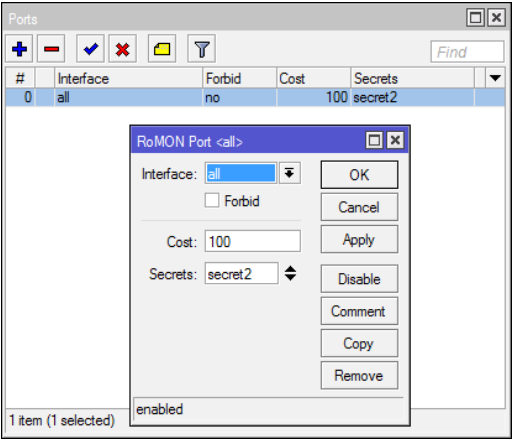
RoMON Ports

Interfaces on which RoMON can do communication
Different Cost Interfaces

  • – Same Cost used for TX/RX

Override Secret for Interfaces

RoMON using Winbox

  • Connect to RoMON enabled router using v3.x Winbox with IP or MAC address

RoMON using Winbox

  • Select the routers RoMON ID to connect to
  • RoMON Winbox Features
  • Using a RoMON enabled network device connection it is possible to connect to any RoMON enabled device which is reachable from the host device
  • Provides easy Winbox management withing remote networks like it would be a local network
  • Drag-and-drop supported to upload files to the remote RoMON device

What you can read next

MikroTik Newsletter #2018-8, July 10, 2018
You have been invited to attend MikroTik User Meeting “Toronto, Canada, 2019” MUM 2019
How to upgrade 24 MikroTik RouterBOARDs less than an hour!

Recent Posts

  • Load-balance using PCC in MikroTik RouterOS v 6.xx

    Introduction PCC “Per Connection Classifi...
  • Audience – a router for those who value both beauty and functionality

    Audience is a tri-band (2.4 GHz & high + lo...
  • DO NOT let the cables limit you, More Throughput over Power!

    PWR-LINE PRO PWR-LINE PRO (PL7510Gi) is a smart...
  • The First MikroTik product with 10G RJ45 Ethernet ports, CRS312-4C+8XG-RM

    CRS312-4C+8XG-RM Switch of the future: the firs...
  • Netflix has identified vulnerabilities in RouterOS.

    Netflix has identified several TCP networking v...

RSS MikroTik Blog

General information

MikroTik Training Schedules
My Certificate Validation
Who is my local MikroTik Consultant
How to become a MikroTik Consultant
How to become a MikroTik Certified Trainer

Useful URLs

MikroTik Distributor
MikroTik WiKi "Documentation"
MikroTik useful Articles and Examples
The Dude "Monitoring, Notification, Syslog"
User Manager "Free Radius Server"

Legal

  • Privacy Policy
  • General Term
  • Training terms
  • Managed Services Terms
  • Partner term
  • GET SOCIAL
MikroTik Value Added Distributor, MikroTik Training Centre, MikroTik Toronto, MikroTik Canada

Copyright © 2015 WirelessNetware. All rights reserved.

TOP